


Piano Fire: Edm Music & Piano
4.65.82K Reviews
App Specs
- Version
- 1.0.251
- Updated On
- License
- Free
- Downloads
- 100,000,000+
- Developer
- Adaric Music
- Categories
- Music
- Platform
- Android
Screenshots
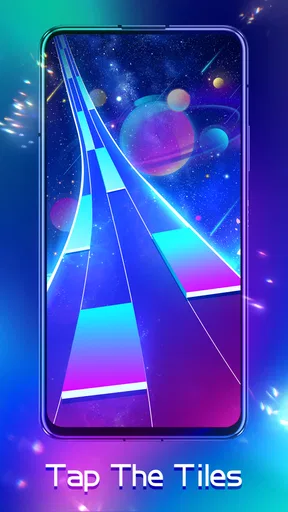


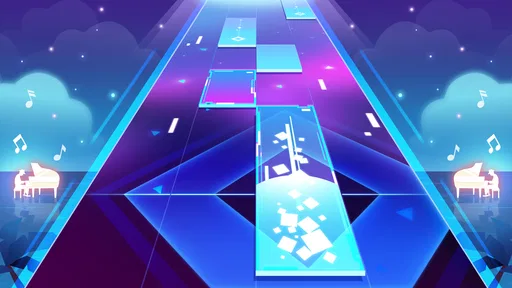
 Analysis by AppCompare
I like rhythm games best when they make a small action feel satisfying right away, and that is the appeal I look for in Piano Fire. You tap falling tiles in time with music, get immediate feedback from how cleanly you keep the beat, and then decide whether to try the track again or move on. It is an easy idea to understand, but the changing pace gives each attempt a little tension. If you enjoy using a spare moment to focus your hands and ears, this music game can make a short break feel more active than simply putting on a playlist.
Who will enjoy its quick musical challenge
Piano Fire: Edm Music & Piano is a game from Adaric Music, and it is aimed at people who want to interact with music rather than just listen. You do not need to know how to play a real piano: the central task is following the on-screen tiles and keeping your timing steady. That makes it approachable for casual players, while faster passages can still give rhythm-game fans a reason to concentrate.
I would reach for it while waiting for a friend, taking a short break between tasks, or unwinding at home when I want something more engaging than scrolling. A track gives the session a natural boundary: I can play once, notice where my timing slipped, and decide whether I have time for another attempt. That simple start-and-stop rhythm is useful when I do not want to commit to a long game session.
What the tapping loop asks of you
The first action is straightforward: watch the tiles, listen to the beat, and tap as they arrive. The challenge is that sight and sound have to work together. Looking only at the tiles can make a change in rhythm catch me off guard; listening closely helps me anticipate the pulse instead of reacting at the last instant. The most satisfying runs are the ones where my taps begin to feel connected to the music rather than like a string of isolated reactions.
That connection is also where the game can be demanding. A song that seems manageable at first may become harder to follow as its pace and patterns shift. If I miss a sequence, I try to identify whether I rushed, hesitated, or stopped listening for the beat. Treating a replay as a chance to fix one specific habit is more useful than tapping faster and hoping for a better result.
Feedback, atmosphere, and concentration
Bright, beat-linked visuals give each tap a lively response, and the neon look suits the energetic music. I find that the effects add excitement, but they can also compete for attention during a tricky section. When a pattern gets busy, I focus on the tiles and rhythm rather than trying to take in every flash on screen. The visual style is part of the fun, yet good timing still comes from keeping my attention on the task.
Sound matters because timing is the whole point. Headphones can make the beat easier to follow in a noisy room, while a quieter setting helps me concentrate without turning a quick game into a volume contest. If I am playing somewhere I need to stay aware of people around me, I keep the sound low and use the visual cues as support. The game works best when I can comfortably notice both.
Worth Reading Before You Choose

Baby Panda World Brings Quick Play to Modern Phones, but Its Game Library Feels Busy

ESPN’s Live Game View Makes Following Close Games Easier

QuizzLand Review: A Good Fit for Short Trivia Breaks, Not Every Player

Basketball Stars: Multiplayer Is Fast, but Can It Recover When Matches Go Wrong?

WEBTOON Turns Phone Updates Into a Better Reading Routine

Link to Windows Runs on Shared Habits, Not Social Feeds
Progress, song choice, and the reason to replay
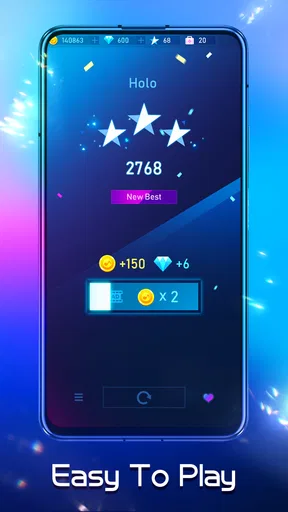
The song library gives me a reason to look beyond a single attempt, while progression offers a small reward for sticking with a track. The basic loop is easy to describe: choose music, follow its pattern, see how well I keep pace, and try again if I want to improve. A replay feels worthwhile when I have a clear target, such as holding a steadier rhythm through a section that caught me out the first time.
Song access and optional spending are worth keeping in mind. The game is free to download, with in-app purchases ranging from $0.99 to $9.99 per item, so I would explore the available play before spending. If you are choosing it for a younger player, it carries a Teen content rating; I would also check the purchase settings on the device and make sure the player understands that optional items can cost money.
How it compares with other music games
Compared with music games built around learning instrument technique, this one is more about quick reactions and staying with a recorded track than practising piano skills. It should not be treated as a substitute for lessons or a keyboard: tapping tiles may sharpen attention to timing, but it does not teach hand position, reading notation, or playing a melody on an instrument. If your main goal is learning piano, a dedicated lesson app or a real keyboard is a better fit.
Against other tap-to-the-beat games, its piano framing and vivid presentation give the experience a recognizable mood. The trade-off is that anyone who prefers a quiet, restrained interface may find the bright effects distracting, and players who want a deep music-creation tool will not get that kind of activity from a tile-tapping loop. I see it as a compact rhythm challenge, not a replacement for a music player, a piano tutor, or a larger action game.
Useful ways to make a session feel better
For a first session, I would choose a track that feels comfortable rather than immediately chasing the hardest challenge. That gives me room to learn how the tiles line up with the beat. On a replay, I would change only one thing: listen more closely, keep my eyes nearer the next tile, or relax my tapping instead of rushing. This small adjustment makes it easier to tell what helped and keeps a miss from turning into frantic tapping.
It is also worth thinking about where you play. The flashing visuals may be more enjoyable in a dim room, but a bright display and quick movement can be tiring if I keep going when my attention is already fading. I treat a drop in concentration as a good reason to stop, rather than forcing another attempt. Short, deliberate sessions suit the game better than playing on autopilot.
What to expect before installing
The game is free, has an average rating of 4.6 from around 725,000 ratings, and has passed 100 million installs. It was released on September 18, 2020, and version 1.0.233 requires Android 6.0 or later. Those details make it a widely used option, but they do not tell me whether its particular mix of songs and visual style will suit my taste. I would judge that by trying a few tracks and paying attention to whether I enjoy repeating them.
One practical question is whether it works for a very brief break: yes, the track-based format makes it easy to play in short bursts, as long as you can focus on the screen and sound. Another is whether it is a good fit for someone who dislikes repetition. Since improvement comes from replaying a pattern and refining timing, players who need constant new activities may lose interest sooner than those who enjoy mastering a familiar sequence.
Getting Started with Your Musical Journey
So, diving into Piano Fire: Edm Music & Piano was a breeze. The installation was quick, and before I knew it, I was navigating the vibrant interface. The first thing that caught my eye was the clean design, with an intuitive layout that makes it super easy to jump right into the action.
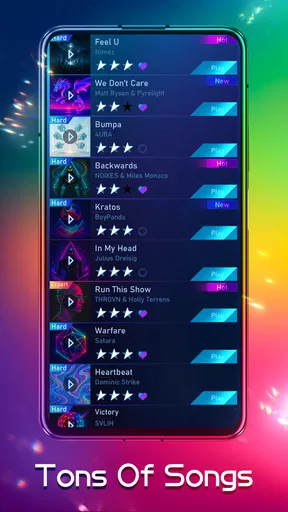
Once you open the app, you’re greeted with a library of songs. From popular EDM tracks to soothing piano melodies, there’s a little something for everyone. The game kicks off with a few free tracks, and as you progress, more songs become available either through in-game currency or purchases.
Gameplay That Keeps You Hooked
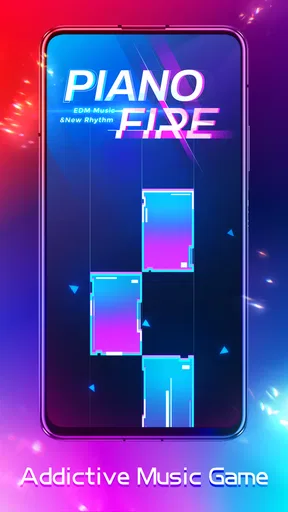
Alright, let’s talk about the gameplay. If you've played rhythm games before, you’ll feel right at home. The idea is simple: tap the tiles as they appear to the rhythm of the music. But don’t be fooled, it starts easy and then ramps up in difficulty, testing your timing and reflexes. The adrenaline rush when you hit a perfect combo is incredibly satisfying!
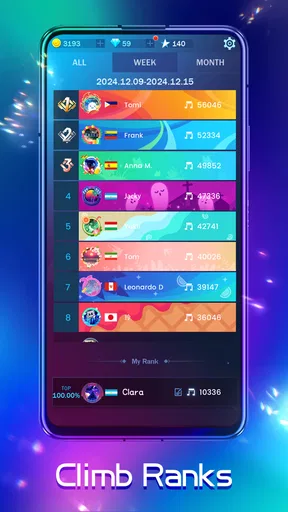
The app also offers different modes, including a challenge mode where you can compete with other players worldwide. This adds a competitive edge, pushing you to improve and climb the leaderboards.
Visuals and Sound Quality
The visuals in this app are pretty striking. As you play, you’re treated to a light show that syncs with the beats. It’s visually stimulating, and the neon colors really pop, especially in a dimly lit room.
Now, onto the sound quality. It’s top-notch, capturing the essence of each track beautifully. Make sure you’ve got a good pair of headphones for this one—you won’t regret it. The music is clear and crisp, which is crucial for rhythm games where timing is everything.
Features Worth Mentioning
One of the standout features of the app is its diverse music selection. Whether you’re into high-energy EDM or classical piano pieces, the variety is impressive. Plus, the app frequently updates its library, so there’s always something new to try.
Another neat feature is the customizability. You can adjust the speed and difficulty of the songs, which is perfect if you’re looking to challenge yourself or if you’re just starting out and need to take it slow.
Why You Should Give It a Try
In a sea of music games, Piano Fire: Edm Music & Piano stands out for its engaging gameplay and stellar soundtrack. It’s a fun way to unwind, hone your rhythm skills, and maybe discover some new tunes along the way.
If you’re ready to get those fingers flying across the screen, I highly recommend giving this app a shot. Whether you’re a seasoned music game veteran or a curious newcomer, there’s plenty here to keep you entertained.
So, grab your headphones, turn up the volume, and get ready to fire up the piano! This app is a delightful blend of music and gaming that’s sure to strike a chord with anyone who loves a good rhythm challenge.
Where the loop works best
The strongest reason I would recommend it is the quick feedback between an action and its result. I tap, hear and see how the run is going, then decide whether to reset my focus and take another go. That rhythm makes a commute wait or a quiet pause at home feel purposeful without asking me to plan a lengthy session. I would not play while walking, crossing a street, or doing anything that needs my eyes and hands elsewhere; the same concentration that makes the game satisfying also makes divided attention a poor fit.
For a more useful replay, I would avoid changing several settings at once. If a track feels too fast, adjusting the available speed or difficulty options can make it more approachable; once the pattern is comfortable, I can raise the challenge and see whether my timing holds. This is a practical way to distinguish a song that is genuinely beyond my current pace from one that only feels unfamiliar. It also keeps a difficult attempt from becoming a string of rushed taps.
Limits that matter in everyday use
The game’s strongest qualities depend on enjoying repetition, bright feedback, and music-led timing. If I want to relax with no pressure to react, listening to a playlist is the better choice. If I want to build piano technique, a learning tool with instruction and instrument practice is more suitable. And if visual effects bother me or I prefer a calmer presentation, the energetic style may become tiring rather than motivating. Knowing that distinction before installing saves disappointment: this is an interactive rhythm game, not a general music utility.
There is also a difference between liking the idea of a song and wanting to replay its tile pattern. A track may sound appealing but still feel awkward to play, so I would test several available choices before deciding whether the game’s library suits me. Optional purchases can expand what is accessible, but I would set a spending boundary first and treat buying as a choice, not a requirement for discovering whether the core loop is enjoyable.
A recommendation with a clear boundary
For a teenager or adult who likes tapping along to energetic music and improving through retries, this is an easy game to sample. It has an average rating of 4.6, around 5,800 written reviews, and more than 100 million installs, which suggests that many people have tried it, though popularity alone cannot promise a personal match. I would start with a free session, use headphones only where it is safe and comfortable, and see whether the feedback makes me want to refine my timing.
My verdict is that Piano Fire is at its best when I treat each run as a small challenge: listen, tap, notice what went wrong, and reset with one adjustment in mind. That cycle gives the game its pull without requiring a big commitment. If you want a light, focused music game and are happy to replay patterns, I think it is worth trying. If you want piano lessons, a quiet listening experience, or a game that constantly changes its activity, I would choose something else.
Pros
- Engaging EDM and piano fusion.
- Intuitive and smooth gameplay.
- Regular updates with new songs.
- Offline mode available.
- Visually appealing interface.
Cons
- Ads can be intrusive at times.
- Limited free song selection.
- In-app purchases can be pricey.
- Requires good device performance.
- Some songs need internet access.
FAQs for Piano Fire: Edm Music & Piano
What is Piano Fire: Edm Music & Piano, and how does it work?
Piano Fire: Edm Music & Piano is a dynamic rhythm game that combines the elements of piano music with exciting EDM tracks. Players tap on tiles as they appear on the screen in sync with the music, creating a seamless musical experience. The app offers a wide variety of songs, allowing users to enjoy different genres and challenge their reflexes.
Is Piano Fire suitable for all age groups?
Piano Fire is designed to be accessible and entertaining for players of all ages. Its intuitive interface and adjustable difficulty levels make it suitable for both beginners and experienced players. The game also features a vast library of songs, catering to diverse musical tastes, which ensures that everyone can find something they enjoy.
Does Piano Fire require an internet connection to play?
Piano Fire can be played offline, making it convenient for users who want to enjoy the game without an internet connection. However, to access certain features such as downloading new songs or participating in online leaderboards, an internet connection is required. This flexibility allows users to enjoy the game anytime and anywhere.
Are there any in-app purchases in Piano Fire?
Yes, Piano Fire offers in-app purchases that allow players to unlock additional songs, remove ads, or purchase virtual currency for enhanced gameplay. While the game is free to download and play, these optional purchases can enhance the gaming experience. Players can enjoy the core features without spending money, making it accessible to everyone.
How does Piano Fire ensure user privacy and data security?
Piano Fire prioritizes user privacy and adheres to strict data protection standards. The app collects minimal personal information necessary for improving user experience and offers clear privacy policies that explain data usage. Users can rest assured that their data is handled responsibly, with options to manage privacy settings within the app.


